


Zipline - Drone Delivery
4.9372.00 Reviews
App Specs
- Version
- 4.28.0
- Updated On
- License
- Free
- Downloads
- 50,000+
- Developer
- Zipline
- Categories
- Food & Drink
- Platform
- Android
Screenshots

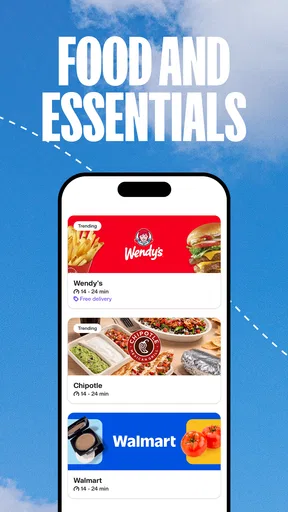
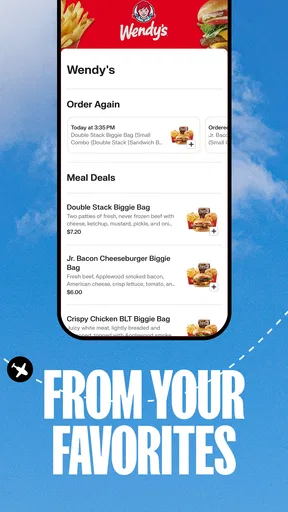
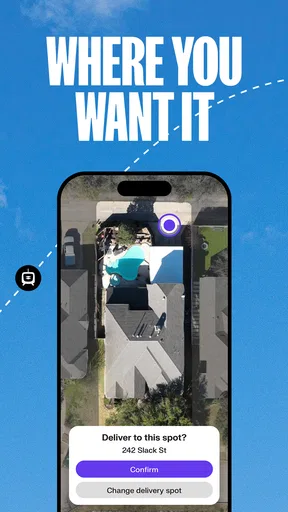
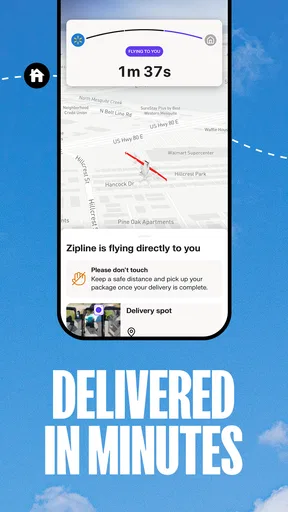
 Analysis by AppCompare
I first looked at Zipline as a practical household app rather than as something I would open just to browse. Its purpose is straightforward: it brings food, groceries, and other everyday purchases into one ordering experience, with delivery handled through Zipline’s service. That makes it most interesting when several people share a home, have different schedules, or need a quick way to coordinate an order without turning a simple meal into a group chat project.
My overall impression is positive. The app is free, aimed at Everyone, and developed by Zipline. It feels focused on the moment when you need something delivered, not on filling the screen with unrelated content. The current version is 4.28.0, and the Android listing supports devices running Android 7.0 or later. That broad compatibility is useful in a household where not everyone has a recent phone.
How Zipline fits into a shared household
A realistic use case is a home where one person is finishing work, another is looking after children, and somebody else notices that dinner ingredients or a few essentials are missing. Instead of asking one person to search several separate services, the household can use the same delivery app to look for what is needed and place the order from the person who is actually available at that moment.
That sounds simple, but the practical advantage is that the app gives the household a common place to start. Food and groceries sit within the same general experience, so the person ordering does not necessarily have to decide in advance whether the need belongs to a restaurant app or a supermarket app. I found that especially helpful for mixed errands: a prepared meal for now, plus a few items that can cover the next morning.
There is an important distinction, though. Zipline is not a family organizer or a shared shopping list by itself. I would not treat it as a replacement for a household notes app, a calendar, or a clear agreement about who is paying. Its value comes after the household has decided what it wants. The app can support the purchase, but it does not remove the need for people to communicate.
For a shared device, I would use it deliberately. If a tablet or phone is used by several people, the person placing the order should check the active account, delivery details, and payment step before confirming anything. That is ordinary caution, but it matters more when several household members can pick up the same device. A shared screen makes convenience possible, yet it also makes account boundaries easier to blur.
I also think the app suits households with uneven availability. A parent may order while another adult is at home, a roommate may handle groceries while someone else chooses dinner, or a student may arrange a meal without asking another person to do the entire task. The useful workflow is not “everyone controls everything”; it is “the right person handles this order, with enough information for the others to know what is happening.”
Worth Reading Before You Choose

EA SPORTS FC Mobile 26 Is a Bigger Football Game, but It Takes Time

Flipboard Shows What News Apps Must Do Beyond the Feed

Switching to Android Auto Means Rethinking Your Driving Routine

Google Calendar Makes a Crowded Week Easier to Manage

Ludo King Makes the Most of the Minutes Between Plans

Baby Panda World Brings Quick Play to Modern Phones, but Its Game Library Feels Busy
What the first setup should establish
Before relying on the app for a busy evening, I would set it up on the device and take a few minutes to understand whose account is active. That is more important than exploring every screen. In a household, the main boundary is not technical complexity; it is responsibility. One person should know which account is being used, who will receive the delivery, and who is expected to approve the final order.
I would avoid casually handing the phone around during checkout. A better routine is to let the person who started the order finish the review, while other household members contribute their requests before the final confirmation. This reduces the chance of duplicate items, an incorrect address, or an order being submitted before everyone has had a chance to speak.
Another useful habit is to separate browsing from commitment. Someone can look through available food or groceries and discuss options with the household, but the final action should happen only after checking the basket and delivery information. This two-stage approach is particularly sensible on a shared device, where a child or guest might tap through a screen without understanding that the action has consequences.
I would also explain the difference between selecting an item and completing a purchase to younger users. The Everyone rating makes the app broadly accessible from an age-classification perspective, but that should not be confused with independent purchasing authority. An age label tells me how the app is classified; it does not decide whether a child should use an adult’s account or payment method.
For older relatives, the setup question is different. The app may be useful if they want delivery without making a phone call, but I would first make sure they are comfortable reviewing the order and recognizing the final confirmation step. If the interface or ordering flow feels unfamiliar to them, a family member can help with the first attempt while leaving the older user in control of the choices.
Coordinating orders without creating confusion
The strongest household workflow I found is simple: one person gathers the requests, one person checks the details, and the household agrees on who will be available to receive the delivery. Those roles can belong to the same person, but naming them avoids the common problem where everybody assumes somebody else is watching the order.
For a shared meal, I would ask each person to state the actual need rather than sending vague messages such as “get something for dinner.” That makes the app more useful because the person browsing can make a clear decision instead of guessing. It also helps when food preferences differ. A household can agree on a main order while handling individual choices separately, rather than repeatedly opening and abandoning baskets.
Zipline is also a reasonable option when an errand combines immediate food with grocery needs. The trade-off is that one delivery-oriented app may be more convenient than visiting several services, but it may not offer the same depth of selection or specialized shopping tools as a dedicated grocery service. If I needed a carefully planned weekly shop, I would compare the available selection with a supermarket app before assuming this was the best route.
That comparison is one of the app’s most important limitations. A restaurant-only service may be better when I already know exactly which restaurant I want. A supermarket app may be better for a long list, product substitutions, or a recurring household routine. Zipline makes more sense when I value a unified starting point for food and groceries and when the available local options meet the need.
I would not build a household routine around the assumption that every desired item will always be available. Delivery apps depend on what can be offered in the user’s area and at the time of ordering. The practical tip is to decide on an acceptable alternative before reaching checkout. That way, the order does not stall because one person is waiting for a reply about a small substitution.
Another non-obvious benefit of a shared workflow is reducing duplicate orders. If two people independently notice that the household needs the same basics, both may place an order unless there is a clear handoff. A quick message saying “I’m handling this order” can be more valuable than any extra browsing feature. The app supports the transaction, but the household still needs a visible owner for each purchase.
Age, trust, and account boundaries
Because the content rating is Everyone, I can imagine the app being present on a family device without feeling out of place. Still, I would keep adult responsibility around account access and payment decisions. A child might help choose a snack or suggest a meal, but I would not let that become unsupervised access to an adult’s account.
This is also relevant for roommates and guests. A shared household does not automatically mean a shared account should be used by everyone. If one person’s account contains delivery information or payment details, the others should not treat the phone as an open ordering terminal. The safest arrangement is clear permission: one person places the order, and everyone else contributes requests through an agreed channel.
I appreciate that this boundary can be handled through household habits rather than complicated rules. Before confirming, I would check the recipient, the location, and the contents of the order. I would also make sure the person expecting the delivery knows what was ordered. That last step is easy to overlook when the app makes the purchase feel quick, but it prevents a delivery from arriving to an empty home or to someone who was not expecting it.
Trust matters in another way too. When I use a delivery app, I am trusting the service to present the order clearly enough for me to make a sensible decision. I would read the item details and review the basket rather than relying on a quick visual scan. This is especially important when another household member has asked for a specific product and the first result looks similar but is not necessarily the same choice.
For teenagers, I see a useful supervised role: they can help assemble an order, compare options, and learn how household purchases are planned. I would keep the final confirmation with an adult until the family is comfortable with the arrangement. For younger children, I would limit their involvement to choosing between options while an adult controls the account and checkout.
Older users may appreciate the convenience, but I would pay attention to whether the app fits their preferred way of ordering. Someone who dislikes entering details on a phone may still prefer a familiar local shop or a family member’s help. Zipline is not automatically better simply because it is digital. The right choice depends on whether the person feels confident reviewing and confirming the order.
Everyday strengths and points of friction
The clearest strength is focus. Zipline does not need to be explained as a large lifestyle platform; I understand it as a way to arrange food, groceries, and related purchases through delivery. That narrow purpose makes it easier to recommend to someone who wants a practical tool rather than another app full of distractions.
Its free price also lowers the barrier to trying it. I could install it without treating the decision as a financial commitment, which is helpful for a household deciding whether one service fits its local routines. The app has an average rating of 4.9 from around 1.8 thousand ratings, and it has passed 50 thousand installs. Those figures suggest that users have responded well overall, although they do not guarantee that every local ordering experience will feel identical.
The main friction is that convenience depends on context. If the nearby selection is limited, if the household needs a very specific product, or if the order requires careful weekly planning, another service may be more suitable. I would also avoid assuming that combining food and groceries always saves time. For a small, urgent order it can be efficient; for a large, organized shop, a dedicated grocery workflow may remain clearer.
Another limitation is coordination. The app can make placing an order quick, but it cannot decide who should pay, who will receive it, or whether two people are already ordering the same thing. In a household with frequent misunderstandings, the solution is not simply to install the app on more devices. It is to establish one ordering routine and make the responsible person obvious.
I would also be cautious about using a shared device when the household is not physically together. If someone is ordering for another person, they should confirm the delivery details directly instead of assuming that an old address or familiar location is still correct. That is a small step, but it is one of the most useful habits for avoiding an otherwise preventable mistake.
Who should choose it, and who should skip it?
I would recommend Zipline to people who want one place to begin when they need delivered food or groceries, especially households where different members take turns ordering. It is also a sensible trial for someone who wants a free app with broad Android compatibility and an Everyone content rating.
It is a particularly good fit for a busy home with short, mixed errands: dinner tonight, a few breakfast items, or groceries needed before the next planned shop. The app can reduce the number of separate services a person has to check, while still leaving room for household members to contribute to the decision.
I would skip it, or at least compare it carefully, if my priority were a highly specialized grocery catalog, a long-term meal-planning system, or a particular restaurant that is easier to use through its own service. I would also choose another option if the people sharing the home cannot agree on account access and payment responsibility. No delivery interface can compensate for unclear boundaries.
For a person who orders only occasionally, the low commitment makes experimentation reasonable. I would start with a modest order, involve the household member who will receive it, and pay attention to how easy it is to review everything before confirming. That first experience tells me more than a generic promise of convenience because it shows whether the app’s available choices actually match the home’s needs.
My household verdict
After using Zipline as a food and grocery delivery tool, I see it as a practical option rather than a complete household-management solution. Its best role is to help one clearly responsible person turn a shared request into an order, while everyone else contributes information without taking over the account.
I like the balance between a focused purpose and a low entry barrier. The strong user response, free pricing, and support for older Android devices make it easy to consider, while the Everyone rating means it can sit comfortably on a family device. Those advantages are real, but they work best when adults still supervise account use and checkout decisions.
My final advice is to use it with a simple routine: agree on the order, assign one person to confirm it, check the recipient and delivery location, and tell the household what to expect. If your needs are small or mixed, Zipline may be more convenient than jumping between separate food and grocery apps. If you need a specialized catalog or a detailed recurring shopping system, another service may serve you better.
For shared households, Zipline is strongest when it supports coordination without pretending to replace it. I would recommend giving it a try for everyday delivery needs, while keeping account access, payment approval, and final confirmation clearly in adult hands.
Pros
- Fast delivery for eligible medical supplies and essential goods
- Helps reach remote areas with limited road access
- Electric drones can reduce emissions from ground transport
- Contactless drop-offs improve convenience and safety
- Reliable service for urgent deliveries in supported regions
Cons
- Availability is limited to selected locations and delivery zones
- Not suitable for large
- heavy
- or temperature-sensitive items
- Weather conditions may delay or cancel drone flights
- Delivery tracking and app features can vary by region
- Some services may require participating healthcare providers or partners
FAQs for Zipline - Drone Delivery
What is Zipline - Drone Delivery, and how does it work?
Zipline is a drone-delivery service designed to transport items such as medical supplies, prescriptions, groceries, and other eligible products directly to a delivery location. After placing an order through a supported partner or service, the order is prepared at a nearby fulfillment center. An autonomous aircraft then carries it to the destination and releases the package safely, usually into a designated drop area. Availability depends heavily on your location and local Zipline partnerships.
Can I use Zipline - Drone Delivery everywhere?
No. Zipline is not a universally available delivery app in the same way as a typical food or shopping platform. The service operates only in selected cities, regions, and partner networks, and coverage can vary even within the same area. Before downloading or attempting to place an order, check whether Zipline serves your address and whether local hospitals, pharmacies, retailers, or restaurants are participating in the program.
What kinds of products can be delivered by Zipline drones?
The available product range depends on the Zipline program operating in your area. Deliveries may include prescription medicines, medical products, vaccines, groceries, restaurant meals, and other lightweight essentials. Size, weight, temperature, packaging, and safety regulations can limit what is eligible. The app or connected ordering service should show the products and retailers currently supported, so the selection may differ significantly from one location to another.
How fast and reliable are Zipline drone deliveries?
One of Zipline’s main advantages is speed, particularly for urgent medical deliveries and small orders. In suitable conditions, a drone may complete a delivery much faster than a traditional vehicle. However, estimated times are not guaranteed. Weather, air-traffic restrictions, operational demand, inventory, address verification, and local regulations can affect fulfillment. If drone delivery is temporarily unavailable, the service or partner may offer another delivery method or ask you to reschedule.
Is Zipline - Drone Delivery safe, and what happens if there is a problem?
Zipline’s delivery system is built around autonomous aircraft, monitored operations, secure packaging, and designated drop-off procedures. Nevertheless, users should follow the instructions carefully and keep people, pets, and obstacles away from the landing or package area. If an order is delayed, damaged, missing, or delivered incorrectly, contact the retailer or delivery support shown in your order details. Refund, replacement, and cancellation policies can vary by partner and location.


